PlayCroco Payment Methods in Australia
 Available in US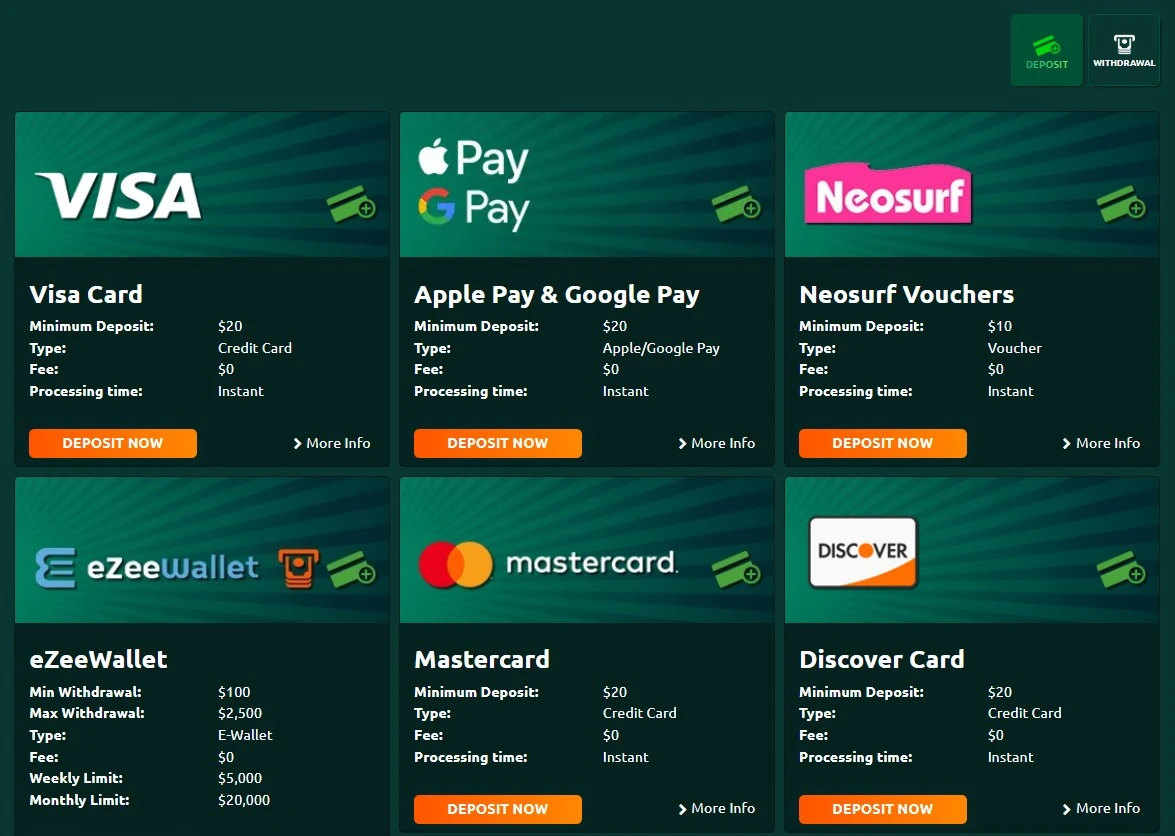
Content
PlayCroco offers a mixed cashier for Australian users, including cards, a prepaid voucher, an e-wallet and several cryptocurrencies. The most useful starting point is not which method is popular in Australia, but which options actually appear in your PlayCroco cashier. Visa and Mastercard have a listed $20 minimum deposit, Neosurf and eZeeWallet start at $10, Ether, Bitcoin, Bitcoin Cash and Litecoin start at $25, and Lightning Bitcoin starts at $5. The banking page shows a $0 PlayCroco fee and instant processing for these deposit methods. Availability can still vary by account, payment provider and sign-up country, so check the cashier after login before depositing.
That distinction matters in Australia. Cards remain the country’s dominant consumer payment method, while PayID is widely used for account-to-account transfers. Neither trend means a particular option is available at PlayCroco. The sections below compare PlayCroco’s listed methods with broader Australian payment habits and explain what to check before depositing. For payout-specific limits and timing, see the PlayCroco withdrawals.
PlayCroco deposit methods at a glance
The banking page lists Visa, Mastercard, Neosurf, eZeeWallet, Ether, Bitcoin, Bitcoin Cash, Lightning Bitcoin and Litecoin as deposit options. The support section separately names Visa, Mastercard, Neosurf, eZeeWallet, Bitcoin, Litecoin and Bitcoin Cash. The banking page gives more detail because it shows method-specific minimums.
| Method | Type | Listed minimum deposit | PlayCroco fee shown | Processing shown |
|---|---|---|---|---|
| Visa | Card | $20 | $0 | Instant |
| Mastercard | Card | $20 | $0 | Instant |
| Neosurf | Prepaid voucher | $10 | $0 | Instant |
| eZeeWallet | E-wallet | $10 | $0 | Instant |
| Ether | Cryptocurrency | $25 | $0 | Instant |
| Bitcoin | Cryptocurrency | $25 | $0 | Instant |
| Bitcoin Cash | Cryptocurrency | $25 | $0 | Instant |
| Lightning Bitcoin | Cryptocurrency | $5 | $0 | Instant |
| Litecoin | Cryptocurrency | $25 | $0 | Instant |
These are cashier values rather than recommendations. A low minimum can be useful if you want to test a payment route, but it does not tell you whether the method will also suit withdrawals, whether your bank or wallet charges its own fee, or whether extra verification will be required. PlayCroco says it does not charge deposit fees, although the payment provider may charge separately.
Cards: familiar in Australia, but check your own issuer
Visa and Mastercard are familiar options for Australian users because cards are widely used for everyday payments. The Reserve Bank of Australia’s 2025 Consumer Payments Survey found that cards accounted for 73% of consumer payments, with debit cards alone representing 49%. That helps explain why card deposits feel familiar, but it does not guarantee that every individual card will be accepted by PlayCroco.
PlayCroco’s public banking page lists both Visa and Mastercard with a $20 minimum deposit, a $0 casino-side fee and instant processing. The page describes the cashier flow as choosing the card category, entering card details and the deposit amount, then submitting the payment. Your bank can still decline a transaction, apply its own controls or treat a merchant differently from ordinary retail purchases. If a card deposit fails, repeatedly retrying the same transaction is usually less useful than confirming that the card is enabled for the transaction and checking the cashier for another supported route.
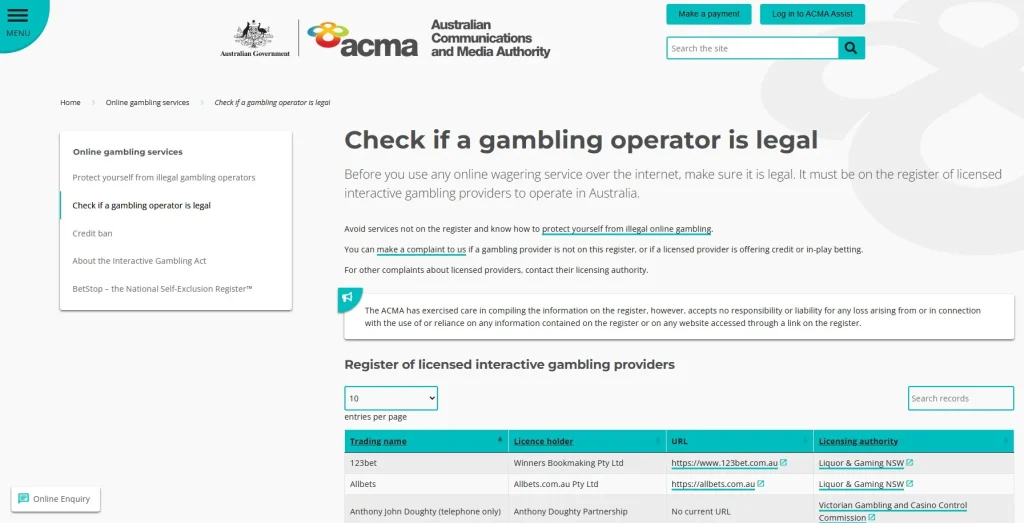
There is also an important Australian regulatory distinction. ACMA’s credit ban applies to licensed online and telephone wagering operators and prohibits them from accepting credit cards and digital currency for betting. That rule does not automatically apply in the same way to PlayCroco casino deposits because the legal category, operator status and service type are different issues. PlayCroco’s listed payment methods therefore need to be considered separately from that wagering-specific rule.
Neosurf: a lower listed entry point
Neosurf has the lowest listed non-crypto minimum among the conventional deposit options, at $10. PlayCroco describes it as a prepaid voucher and says it is available for Australia, New Zealand and Canada. The deposit process is straightforward: obtain a voucher, select Neosurf in the cashier, enter the amount and voucher PIN, and complete the deposit.
The strongest practical reason to consider a voucher is spending separation. You can decide the amount before reaching the casino cashier rather than leaving an open payment instrument attached to the account. That does not make a voucher inherently safer or better, but it can make budgeting more explicit. One detail worth checking is currency. PlayCroco warns that if the voucher currency differs from the cashier currency, additional fees may apply. Australian users should therefore check the currency shown before purchasing a voucher rather than assuming every voucher will settle on identical terms.
eZeeWallet: deposit and withdrawal compatibility
eZeeWallet appears on both the deposit and withdrawal sides of PlayCroco’s banking page. For deposits, the listed minimum is $10 and the page shows instant processing with no PlayCroco fee. That two-way presence can matter because a method that supports both funding and payout may reduce the need to introduce a new withdrawal route later.
Do not assume that using eZeeWallet for deposits guarantees a payout to the same wallet. Withdrawals can depend on verification, method eligibility, previous deposit history and cashier rules. eZeeWallet withdrawal limits and processing conditions should be checked separately from the deposit terms.
Cryptocurrency options
PlayCroco lists Bitcoin, Ether, Bitcoin Cash, Lightning Bitcoin and Litecoin on its banking page. The minimum shown for Bitcoin, Ether, Bitcoin Cash and Litecoin is $25, while Lightning Bitcoin is listed at $5. The page shows instant deposit processing and no PlayCroco fee for these methods.
Crypto deposits add extra operational checks that card users may not be used to. You need the correct network and destination address, should verify the transfer amount before sending, and must account for wallet or network charges that sit outside the casino’s own fee column. The banking page includes wallet guidance for Australian customers in some crypto sections, but wallet availability and local provider conditions can change. Use the live cashier and your chosen wallet’s own instructions rather than copying an old address or assuming a previously used route remains valid.
Cryptocurrency is much less common as an everyday Australian payment method than cards or PayID. The RBA’s 2025 survey found that only around 2% of respondents had used cryptocurrency to make a payment in the prior year. That contrast is useful because it prevents a common review-site mistake: a long crypto list at a casino does not mean crypto is a mainstream Australian payment preference.
What about PayID?
PayID is important Australian context because its use has grown sharply. In the RBA’s 2025 survey, around 50% of respondents said they had used PayID in the prior year. It is an account-to-account addressing system that can use a mobile number, email address or ABN instead of manually entering BSB and account details.
PlayCroco’s public banking list does not present PayID as a named direct cashier option. Its popularity in Australia does not mean PlayCroco supports it. The site does mention funding eZeeWallet through POLi in its e-wallet instructions, but that is a different payment route and should not be treated as PayID.
How to choose a payment method
The best choice is usually the method that works for both your account and your intended withdrawal path, not simply the one with the lowest deposit minimum. Before depositing, run through these checks:
- Confirm it is visible in your cashier. Public banking pages can show the wider product set, while account-level availability may differ.
- Check the currency. Use AUD where offered and avoid assuming a voucher, wallet or crypto conversion is fee-free.
- Check the minimum. The public page shows different thresholds, from $5 for Lightning Bitcoin to $25 for several cryptocurrencies.
- Look ahead to withdrawals. A deposit method and a withdrawal method are not automatically interchangeable. Check the payout side before committing a large balance.
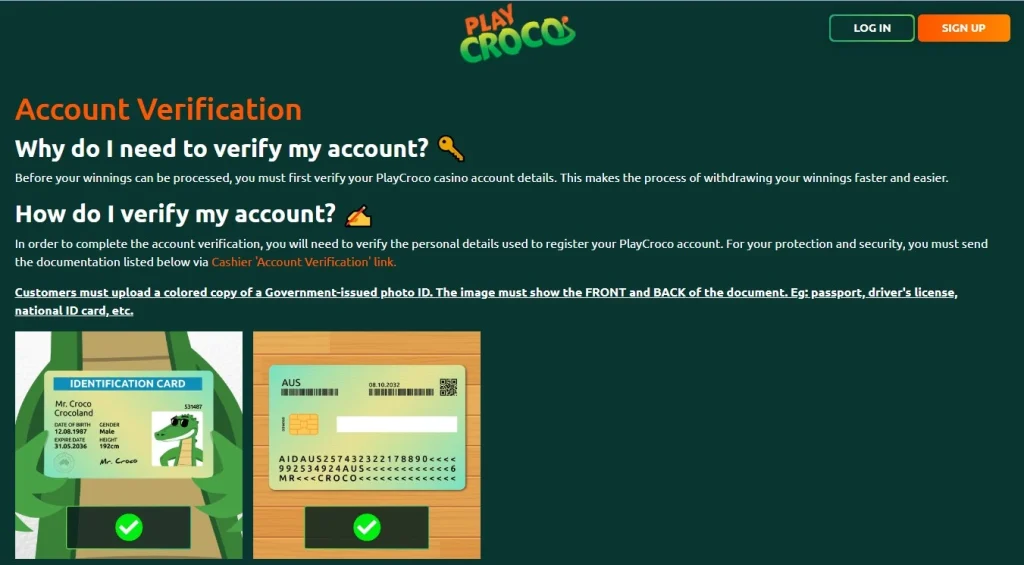
- Expect verification. PlayCroco requires account verification before winnings can be processed. If you plan to withdraw, prepare for KYC rather than treating it as a surprise after play.
- Separate casino fees from provider fees. A $0 PlayCroco fee does not guarantee that your bank, wallet, voucher provider or blockchain route has no cost.
If identity checks are your main concern, read the account verification requirements. For the broader sign-up sequence, see PlayCroco account setup.
Deposit method versus withdrawal method
Depositing is often simpler than withdrawing because cashouts can involve more conditions: account verification, payout eligibility, method compatibility, minimum and maximum withdrawal amounts, weekly or monthly limits, and method-specific fees. For that reason, deposits and withdrawals are better assessed separately rather than reduced to a vague claim such as “fast banking”.
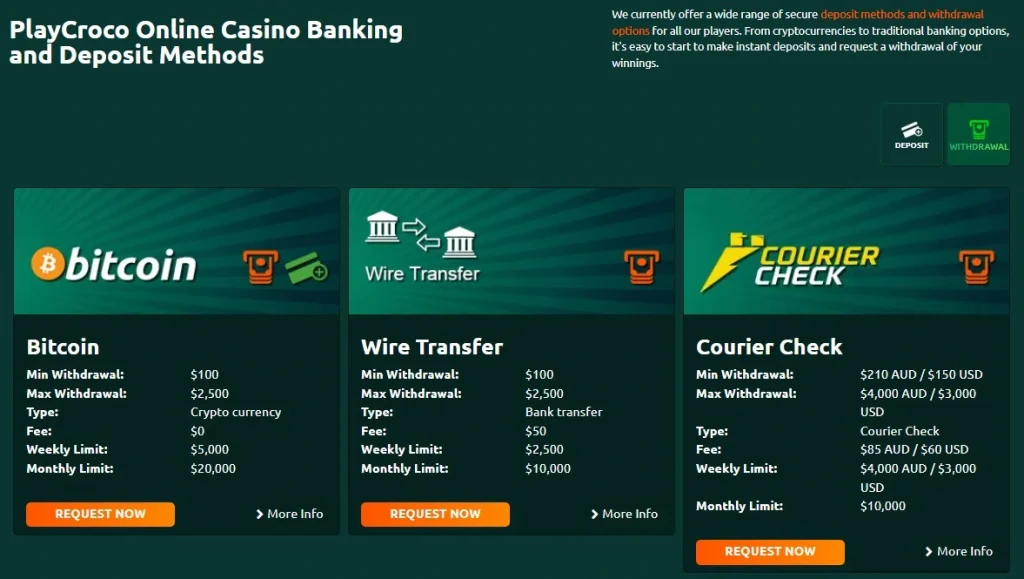
The banking page lists a broad set of deposit methods, while the withdrawal options are more limited and come with their own conditions. eZeeWallet, Bitcoin, wire transfer and courier check are among the payout routes shown publicly, and their limits differ. Cashout limits and timing need a separate check because casino processing and bank or wallet delivery time are different stages.
Australian payment context
Australian payment habits provide useful context when comparing PlayCroco’s cashier. Cards dominate everyday payments, PayID has strong adoption, and cryptocurrency use remains relatively niche. PlayCroco’s banking page separately lists the methods it supports and includes Australia-specific wording in the Neosurf and Bitcoin instructions.
Visa and Mastercard match a payment category Australians already use heavily. Neosurf provides a prepaid option with a lower listed minimum, while PlayCroco offers more cryptocurrency choices than everyday Australian payment habits might suggest. PayID is widely used nationally but is not shown as a direct PlayCroco option on the public banking list. None of this guarantees that a particular transaction will work for every account.
A sensible first-transaction approach
If you are using the cashier for the first time, there is little benefit in choosing a larger deposit simply because a method permits it. Confirm the method in your logged-in cashier, check the currency and provider cost, and use an amount that fits your existing gambling budget. After the transaction, confirm that the deposit is recorded correctly in account history. This gives you a practical check of the route before you rely on it again.
Also decide how you would prefer to withdraw before you play. That one step can reveal whether a deposit-only method would leave you needing a different payout route later, and whether verification documents are likely to be needed for that route.
Bottom line
PlayCroco offers a varied deposit menu rather than one preferred route. Cards start at a listed $20, Neosurf and eZeeWallet at $10, several cryptocurrencies at $25, and Lightning Bitcoin at $5. The public page shows instant deposits and no casino-side fee for these methods. For Australian readers, the main comparison is simple: cards are mainstream locally, PayID is widely used but not shown as a direct PlayCroco option, and cryptocurrency remains a niche payment method despite its prominent place in the casino cashier.
Choose based on what appears in your cashier, the total cost from all providers, and whether the route makes sense for withdrawals. Before depositing significant funds, check the current withdrawal limits and processing conditions, then review PlayCroco trust and regulation. For the overall product assessment, return to the full PlayCroco review.
This material was created by the PlayCroco Australia Guide team.
Related posts
PlayCroco Withdrawals: Methods, Limits and Processing
PlayCroco KYC and Account Verification